
WordPress is widely known for its flexibility and extensibility, making it the most popular content management system in the world. One of the biggest reasons behind this success is its powerful plugin system. While thousands of plugins are available in the WordPress repository, they often fall short when businesses need specific, tailored functionality. This is where custom WordPress plugin development becomes a game-changer.
Custom plugin development allows you to extend WordPress exactly the way your business requires—without unnecessary features, performance overhead, or dependency on third-party tools.
What Is Custom WordPress Plugin Development?
Custom WordPress plugin development is the process of creating a plugin from scratch to add new features or modify existing WordPress behavior based on unique requirements. Unlike off-the-shelf plugins built for mass usage, custom plugins are designed for a single website or business workflow.
These plugins can handle anything from simple enhancements to complex systems, such as:
- Custom payment gateways
- Membership and subscription management
- Booking and appointment systems
- CRM and ERP integrations
- Custom dashboards and reporting tools
A custom plugin integrates seamlessly with your WordPress installation while maintaining performance, security, and scalability.
Why Choose Custom Plugin Development?
1. Built Exactly for Your Needs
Pre-built plugins try to serve thousands of users, which often leads to feature bloat. Custom plugins focus only on what your business needs, making them more efficient and easier to use.
2. Optimized Performance
Third-party plugins often load extra scripts, styles, and database queries. Custom plugins are lightweight and optimized, resulting in faster load times and improved Core Web Vitals.
3. Enhanced Security
Public plugins are common attack targets. A custom plugin is private and less exposed, allowing developers to implement security measures specific to your website and hosting environment.
4. Seamless Compatibility
Custom plugins are developed to work perfectly with your theme, hosting setup, and existing plugins—reducing conflicts and unexpected errors.
5. Complete Ownership
With a custom plugin, you own the code. There are no licensing fees, forced updates, or dependency on third-party developers.
Custom Plugin vs Ready-Made Plugin
| Feature | Ready-Made Plugin | Custom Plugin |
|---|---|---|
| Functionality | Generic | Tailored |
| Performance | Often heavy | Lightweight |
| Security | Public exposure | Private & controlled |
| Flexibility | Limited | Fully customizable |
| Cost | Ongoing licenses | One-time investment |
Ready-made plugins are useful for common needs, but custom plugins offer long-term value for serious businesses.
The Custom WordPress Plugin Development Process
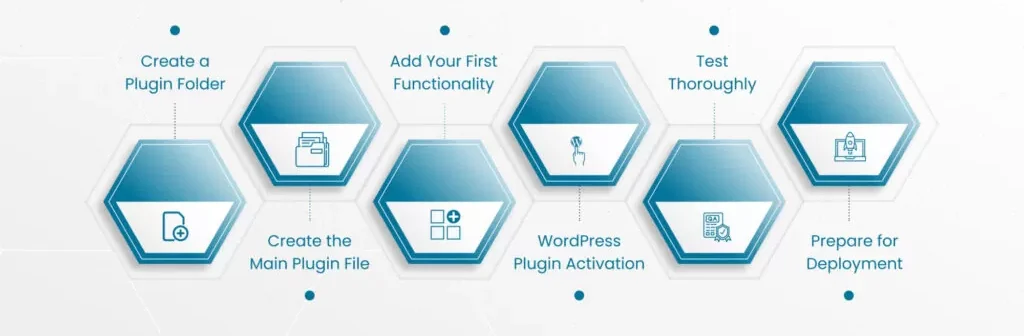
1. Requirement Analysis
The process starts with understanding business goals, workflows, and technical constraints. This step defines the plugin’s functionality, integrations, and success metrics.
2. Planning & Architecture
Developers design the plugin architecture, deciding how it will use WordPress hooks, filters, custom post types, database tables, and APIs. Proper planning ensures scalability and maintainability.
3. Development & Integration
The plugin is developed using WordPress coding standards and best practices. Features such as admin panels, custom APIs, shortcodes, cron jobs, and third-party integrations are implemented during this phase.
4. Testing & Quality Assurance
The plugin is tested across different WordPress versions, themes, and devices. Security testing, performance optimization, and edge-case handling ensure reliability.
5. Deployment & Documentation
After testing, the plugin is deployed to the live website. Clear documentation is provided to help administrators manage and extend the plugin in the future.
Common Use Cases for Custom Plugins
- Custom Payment & Checkout Logic
- Membership & Access Control Systems
- Advanced Forms & Business Workflows
- Third-Party API Integrations
- Automation & Scheduled Tasks
- Custom Analytics & Reporting Dashboards
Custom plugins are especially valuable for eCommerce, SaaS platforms, educational portals, and enterprise websites.
SEO & Performance Advantages
Custom WordPress plugins can significantly improve SEO and performance when built correctly. Since only required features are included, unnecessary scripts and database queries are eliminated. Developers can also:
- Optimize database interactions
- Implement clean, SEO-friendly output
- Support schema markup and structured data
- Improve page speed and user experience
This leads to better rankings, higher engagement, and improved conversions.
Maintenance & Scalability
A well-structured custom plugin is easy to maintain and extend. As your business grows, new features can be added without rewriting the entire system. Regular updates ensure compatibility with future WordPress releases and security standards.
Cost Considerations
The cost of custom WordPress plugin development depends on complexity, integrations, and long-term support requirements. While the upfront investment may be higher than installing a free plugin, the long-term benefits—performance, security, ownership, and scalability—make it a smart business decision.
Final Thoughts
Custom WordPress plugin development allows you to unlock the true potential of WordPress by shaping it around your business needs. Instead of adjusting your workflow to fit a plugin, a custom plugin adapts WordPress to work for you.
If your website requires unique functionality, high performance, or deep integrations, investing in a custom WordPress plugin is not just an option—it’s a strategic advantage.
Need a High-Performance Website?
MeraSEO builds custom websites that rank, convert, and scale. From WordPress to Webflow, our Mumbai development team delivers digital experiences that work hard for your brand.
View Web Development Services →