1. “Just Install Another Plugin” Mentality
Need a small feature? Install a plugin.
Need a tweak? Another plugin.
Over time, dozens of plugins pile up—many doing similar things.
2. Feature Overlap
For example:
- SEO plugin + schema plugin + sitemap plugin
- Page builder + layout plugin + block enhancer
- Security plugin + firewall plugin + login protection plugin
Each plugin adds scripts, database queries, and hooks—often duplicating work.
3. Plugins Depending on Plugins
Some plugins rely on others to function properly. When dependencies aren’t documented or understood, updates or removals can cause unexpected failures.
4. No Ownership of Code
Because plugins are third-party, site owners often don’t fully understand what’s happening behind the scenes. This creates a “black box” effect.
5. Long-Term Site Evolution
As business needs change, plugins are added—but old ones are rarely removed. The result is legacy clutter.
Symptoms of Plugin Spaghetti
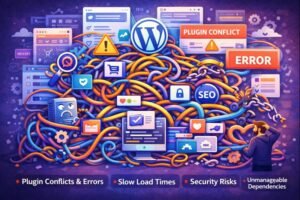
If your site suffers from plugin spaghetti, you may notice:
- ❌ Slow page load times
- ❌ Random layout or JavaScript issues
- ❌ Admin panel feels sluggish
- ❌ Frequent plugin conflicts after updates
- ❌ White Screen of Death or fatal errors
- ❌ Security vulnerabilities from abandoned plugins
- ❌ Fear of updating WordPress or plugins
A common red flag is when no one is confident enough to remove a plugin because “something might break.”
Why Plugin Spaghetti Is Dangerous
1. Performance Degradation
Each plugin can add:
- Extra CSS and JavaScript
- Additional database queries
- Background cron jobs
Too many plugins = slower Core Web Vitals and poor user experience.
2. Security Risks
Every plugin increases your attack surface. Outdated or poorly coded plugins are one of the most common entry points for WordPress hacks.
3. Maintenance Nightmares
Updating WordPress becomes risky. One update can trigger conflicts across multiple plugins, leading to downtime.
4. Scalability Issues
As traffic grows, inefficient plugin architecture can overwhelm your server, leading to crashes or high hosting costs.
5. Technical Debt
Plugin spaghetti is a form of technical debt—it works today but becomes expensive and painful to fix later.
Plugin Spaghetti vs Clean Architecture
| Aspect | Plugin Spaghetti | Clean Plugin Architecture |
|---|---|---|
| Plugin Count | High & unmanaged | Minimal & intentional |
| Performance | Slow | Optimized |
| Security | High risk | Controlled |
| Maintenance | Fragile | Stable |
| Scalability | Poor | Strong |
| Ownership | Third-party heavy | Custom or curated |
How to Avoid Plugin Spaghetti
1. Audit Plugins Regularly
Every 3–6 months, review:
- What each plugin does
- Whether it’s still needed
- Whether functionality overlaps
If you can’t explain why a plugin exists, it’s a candidate for removal.
2. Prefer Quality Over Quantity
One well-built plugin is better than three small ones doing partial jobs.
3. Avoid “Swiss Army Knife” Plugins (Sometimes)
Plugins that do everything can be heavy. Use them only when you truly need multiple features.
4. Check Plugin Health
Before installing:
- Last update date
- Active installs
- Compatibility with latest WordPress version
- Developer reputation
5. Document Your Stack
Maintain a simple document explaining:
- What each plugin does
- Dependencies
- Critical plugins
This is invaluable when teams change.
The Best Long-Term Fix: Custom Plugin Development
One of the most effective ways to eliminate plugin spaghetti is custom WordPress plugin development.
Instead of relying on 5–10 plugins, a single custom plugin can:
- Combine related functionality
- Be optimized for your exact use case
- Reduce scripts and database queries
- Improve security
- Give you full ownership of the code
For example:
- Replace multiple form + workflow + email plugins with one custom solution
- Merge role management, access control, and restrictions into a single plugin
- Build business-specific logic without bloat
This approach dramatically simplifies your architecture.
When Plugins Are Still the Right Choice
To be clear—plugins are not bad. Plugin spaghetti is.
Plugins are ideal when:
- The functionality is standard (SEO, caching, backups)
- The plugin is actively maintained
- There’s no business-specific logic involved
The key is intentional use, not convenience-driven accumulation.
Final Thoughts
Plugin spaghetti is one of the most common—and most expensive—problems in long-running WordPress websites. It creeps in slowly, hides behind “working” features, and eventually causes performance, security, and maintenance issues.
The solution isn’t “no plugins”—it’s fewer, smarter plugins, combined with custom development where it matters.
If your WordPress site feels fragile, slow, or hard to maintain, chances are you’re dealing with plugin spaghetti. Untangling it today can save you significant time, money, and stress tomorrow.
Need a High-Performance Website?
MeraSEO builds custom websites that rank, convert, and scale. From WordPress to Webflow, our Mumbai development team delivers digital experiences that work hard for your brand.
View Web Development Services →